iPhone & iPad · Free to start
The Ultimate AI Skincare Routine App in 2026
Skincare Routine: Bestie reads your skin, checks your products, and builds a morning and evening routine that actually fits you — instead of the one you assembled by guesswork.

Features
-
A baseline, not a guess
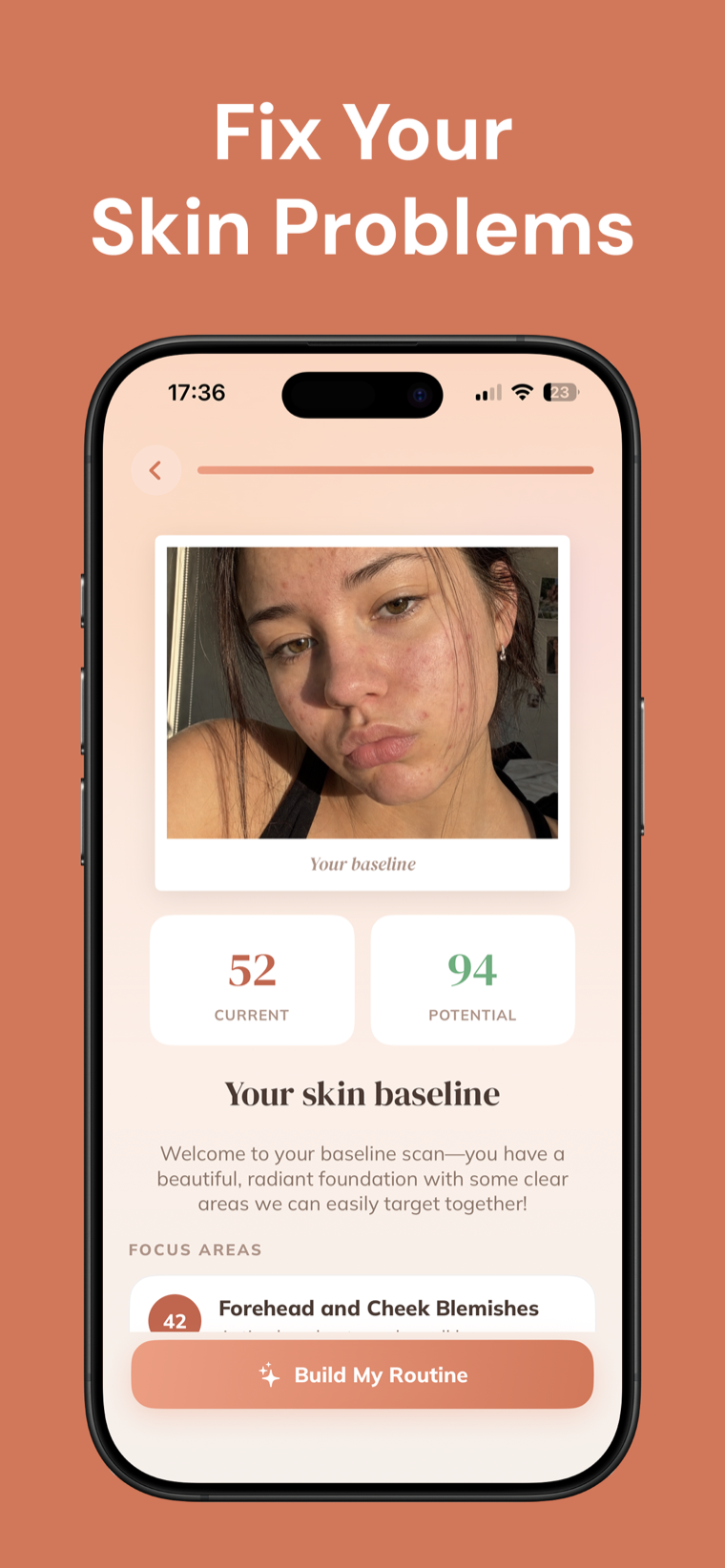
The first face scan returns a skin score and names your focus areas, so the routine is built on something you can actually see.
-
Product fit, scored
Snap any product to see how well it matches your skin and your goals — relevance, safety and effectiveness, each with a reason.
-
Morning and evening steps
A routine split across the two times of day you'll actually do it, generated from your own analysis rather than a generic template.
-
An AI coach that answers back
Ask why a product was scored the way it was, or what a cheaper equivalent would be, and get an answer tuned to your skin.
-
Progress you can see
Quick check-in selfies build a visual record over time, which is the only honest way to judge whether a routine is working.
-
Photos stay yours
Your photos are used to produce your analysis and nothing else — never sold, never posted, never shared. No ads either.
Screenshots
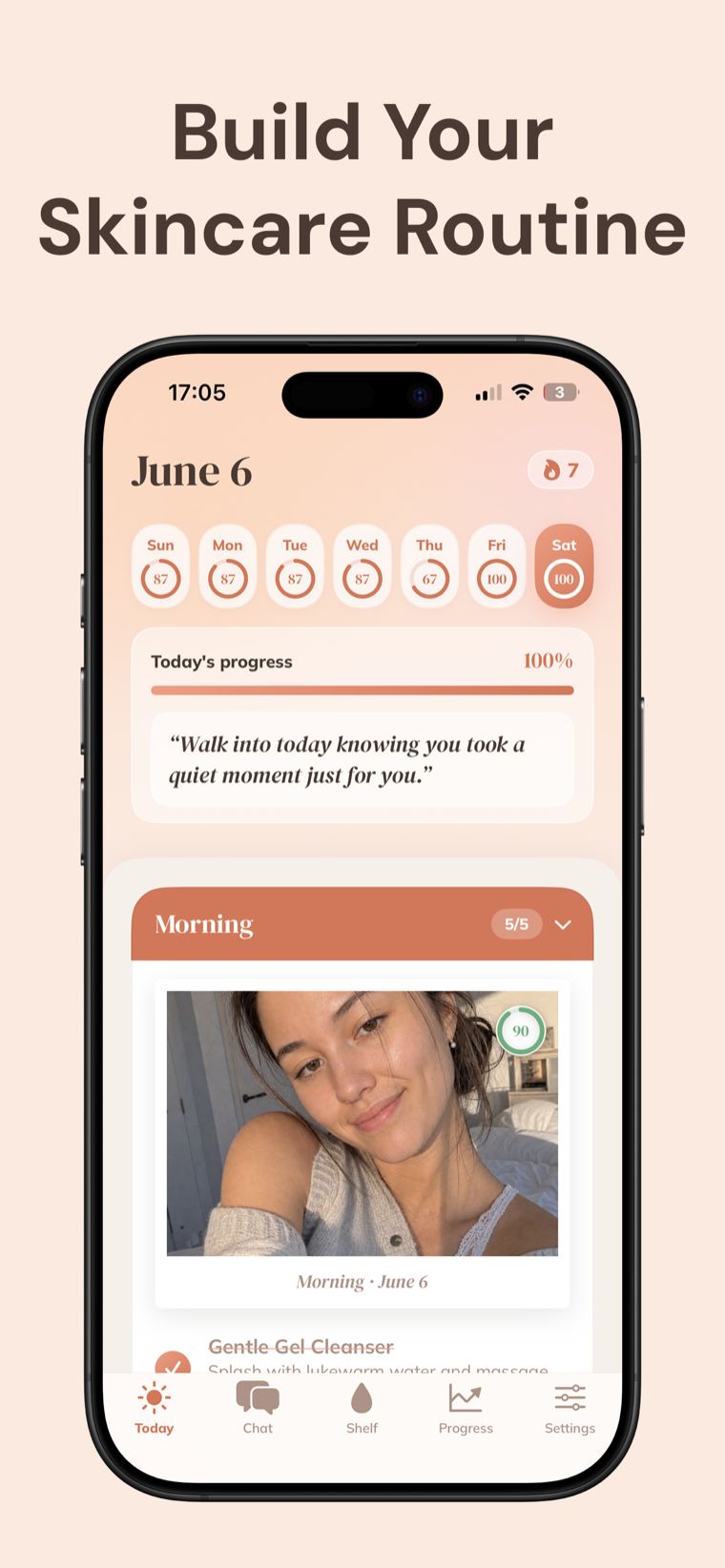
Each day opens on the steps you actually have to do, with the week's completion behind it and a check-in selfie attached to the day you took it.
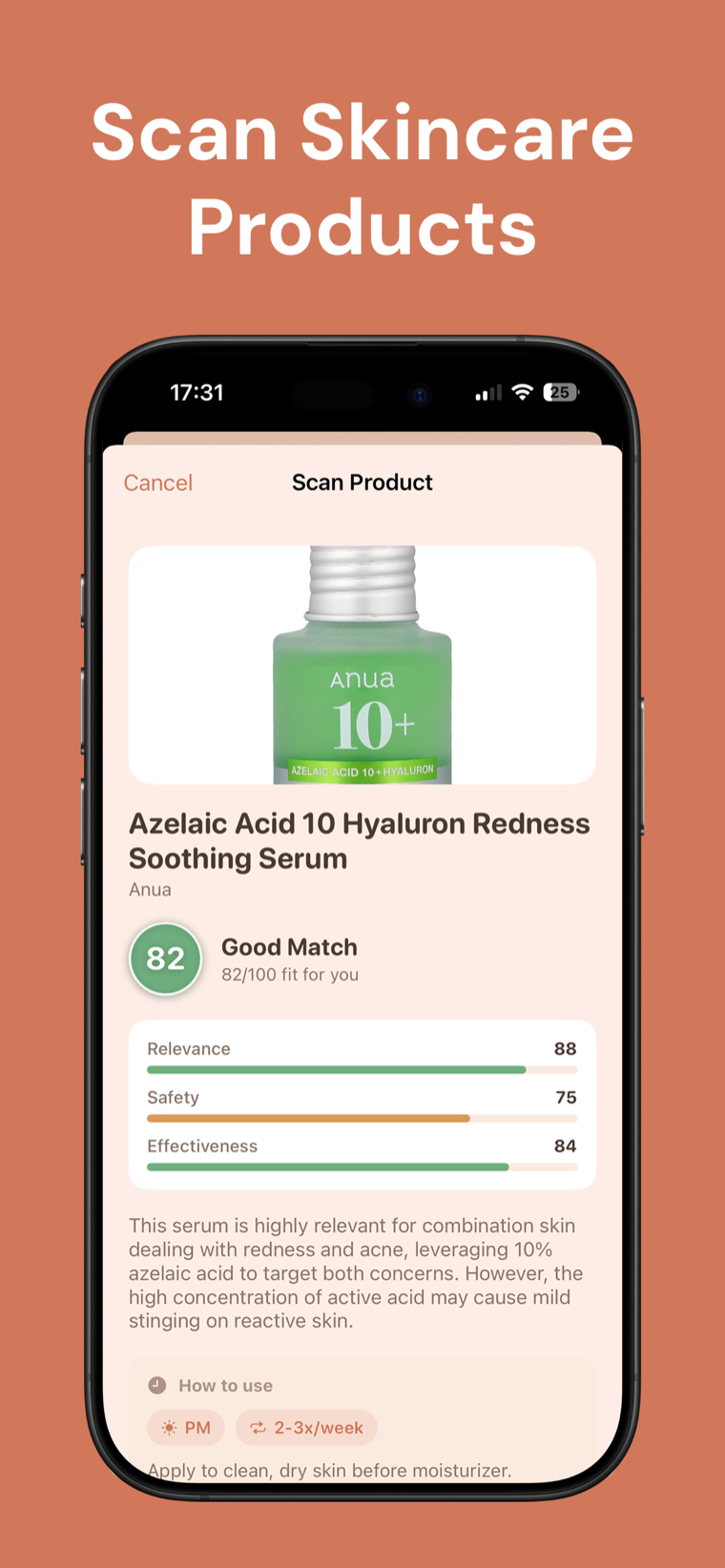
Photograph anything on your shelf and get a fit score broken into relevance, safety and effectiveness — plus when to use it and how often.
How it works
-
Scan your skin
Take a baseline selfie. The analysis returns your skin score and the areas worth working on first.
-
Get your routine
A morning and evening routine is built around that baseline. Scan the products you already own to see which ones belong in it.
-
Check in as you go
Tick off steps, take the occasional check-in selfie, and watch whether the score and the photos actually move.
FAQ
Frequently asked questions
How does the skin analysis work?
You take a baseline selfie and the app analyses it, returning a current skin score, a potential score, and a set of focus areas — for example blemishes on the forehead and cheeks — that the routine is then built around.
Can it tell me whether a product I own is right for me?
Yes. Photograph the product and you get a fit score out of 100, broken into relevance, safety and effectiveness, along with a short explanation and a suggested time of day and frequency for using it.
Is Skincare Routine a substitute for a dermatologist?
No, and it doesn't try to be. The app is an organizer and tracker for your routine — not a medical device and not a doctor. Consult a licensed dermatologist before starting or changing a routine, especially if you have a skin condition, are pregnant, or are breastfeeding.
What happens to my photos?
They're used only to give you your analysis. They are never sold, never posted and never shared.
Can I ask follow-up questions?
Yes. There's an AI chat you can ask anything about your skin — including things like cheaper alternatives to a product you just scanned, which it will answer with specific brands and how to choose between them.
How does it track progress?
Through quick check-in selfies taken as part of your routine, so you build a visual record over time rather than relying on memory about whether something helped.
Will it remind me to do my routine?
Yes. There are gentle reminders for the morning and evening steps so a routine doesn't quietly lapse after the first enthusiastic week.
How long does setup take?
A couple of minutes. You do the baseline scan, answer a short set of questions about your skin and goals, and the first routine is ready.
Does it work on iPad?
Yes. Skincare Routine runs on both iPhone and iPad.
Are there ads?
No ads and no clutter. The app is free to start, with Skincare Routine Pro available as an upgrade.
Can it diagnose a skin condition?
No. It describes what it sees in a photo and organizes a routine around it. Diagnosis is a doctor's job — if something on your skin concerns you, see a dermatologist rather than an app.
How do I send feedback?
There's a contact link in Settings, and it goes straight to the developer.
Stop guessing at your shelf.
Download Skincare Routine and build a routine around your actual skin.
Free Skincare Routine tools
- Skincare Expiration Date CheckerTurn the 6M, 12M or 24M open-jar symbol into a calendar date and use whichever limit comes first.
- Skincare Layering TimerChoose the number of routine steps and the pause you want between them. No prescriptive wait time and no signup.
- Skincare Routine TrackerBuild an AM and PM checklist, mark each step complete and keep progress in this browser. No account or product advice.
- Sunscreen Supply CalculatorPlan a sunscreen supply using only the quantities you enter. The calculator does not recommend an amount, SPF or schedule.
From the blog
All articles →- How long does it take to see skincare results?How long does it take to see skincare results? Learn why hydration feel may change quickly, visible changes take longer, and consistent logging matters.
- Minimalist skincare routine: keep only useful stepsBuild a minimalist skincare routine around cleanser, one optional treatment, moisturizer, and morning sunscreen, then remove duplicate or unused steps.
- Do you need a toner? When the step earns its placeDo you need a toner? Learn what older toners did, how modern hydrating and exfoliating formulas differ, and when the step is useful or skippable.